NBT Weapon Assigning
This module extends Epic Fight by introducing full NBT-based weapon assignment support. It allows weapon types to be defined and selected dynamically based on the NBT data stored within an item.
This approach provides greater flexibility for datapacks and mods, as weapon classification is no longer limited to item IDs alone, but can instead depend on the item’s internal NBT structure.
Making the pack.mcmeta file
First, you'll need to create a pack.mcmeta file. Here's how to do it:
-
Create the File:
- Start by creating a new text file.
- Rename the file topack.mcmeta. Ensure that file extensions are visible so you can properly change the extension (e.g., from.txtto.mcmeta). -
Edit the File:
- Open the file with a text editor and add the following code for your datapack to function properly:
pack_format Values
| Version | Value |
|---|---|
| 1.16.5 | 6 |
| 1.17.x | 7 |
| 1.18.2 | 8 |
| 1.19.2 | 9 |
| 1.20.1 | 15 |
| 1.21.1 | 48 |
Making the folder path
To set up the folder structure, follow these steps. Each folder or file must be nested inside the previous one as per the hierarchy shown below:
data "modid" capabilities "type" "registryname".json -
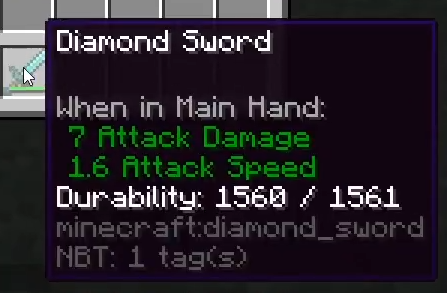
modid: The mod ID is usually the name of the mod. You can often find it by checking in-game item tooltips (pressF3 + Hto enable Advanced Tooltips) or by looking at commands or messages related to the mod.
For example, if the tooltip for an item showsmodid:itemname, the part before the colon(modid)is what you’ll use to name the"modid"folder.
-
type: This refers to the category of the item you’re configuring. Use eitherweaponsorarmors.
-
registryname: To locate an item’s registry name, pressF3 + Hin-game to enable Advanced Tooltips. Then, hover over the item to view its registry name.
Tip
When you create the registryname.json file under the referenced file directory, make sure the file extension is changed from .txt to .json
Creating the JSON file
Similar to Item Capabilities, NBT-based weapon type assignment is defined through a set of conditional variations. Each variation specifies an NBT predicate that is evaluated against the item’s data, and when the condition is met, the corresponding weapon type and attribute overrides are applied.
When there is no variation block that meets the given condition, the default data block speicified outside of "variations" tag is applied.
The following example demonstrates how different weapon types can be assigned on a single item based on the presence of specific enchantment NBT tags. If none of the defined conditions are satisfied, the configuration falls back to the default weapon type (on the example below, sword) and attributes.
{
    "variations": [
        {
            "condition": "epicfight:tag_value",
            "predicate": {
                "key": "Enchantments[].id",
                "value": "minecraft:sharpness"
            },
            "attributes":
            {
                "common":
                {
                    "impact":10.0,
                    "max_strikes":5
                }
            },
            "type":"epicfight:spear"
        },
        {
            "condition": "epicfight:tag_value",
            "predicate": {
                "key": "Enchantments[].id",
                "value": "minecraft:knockback"
            },
            "attributes":
            {
                "common":
                {
                    "impact":5.0,
                    "max_strikes":1
                }
            },
            "type":"epicfight:dagger"
        }
    ],
    "attributes":
    {
        "common":
        {
            "impact":1.1,
            "max_strikes":1
        }
    },
    "type":"epicfight:sword"
}
epicfight:tag_value is doing string-path resolution over the item NBT, and the root is already the item tag compound.
Here's an example:
- For
/give @p netherite_sword{display:{Name:""cool name""}} 1
The Key would be:"key": "display.Name", with"value": "cool name"
Below are some keywords that Minecraft uses as ItemStack NBT Keys
- Display / Visuals
| Purpose | Key |
|---|---|
| Custom name | display.Name |
| Lore (any line) | display.Lore[] |
| Lore (indexed) | display.Lore[0] |
| Leather armor color | display.color |
- Enchantments
| Purpose | Key |
|---|---|
| Enchantment ID | Enchantments[].id |
| Enchantment level | Enchantments[].lvl |
| Stored enchantment ID (books) | StoredEnchantments[].id |
| Stored enchantment level | StoredEnchantments[].lvl |
- Attribute Modifiers
| Purpose | Key |
|---|---|
| Attribute name | AttributeModifiers[].AttributeName |
| Attribute amount | AttributeModifiers[].Amount |
| Operation | AttributeModifiers[].Operation |
| Slot | AttributeModifiers[].Slot |
| UUID (array form) | AttributeModifiers[].UUID[] |
| UUID (least / most) | AttributeModifiers[].UUIDLeastAttributeModifiers[].UUIDMost |
- Durability / Repair
| Purpose | Key |
|---|---|
| Damage value | Damage |
| Unbreakable flag | Unbreakable |
| Anvil repair cost | RepairCost |
- Model / Rendering
| Purpose | Key |
|---|---|
| Custom model data | CustomModelData |
| Hide flags (bitmask) | HideFlags |
- Potion & Status Items
| Purpose | Key |
|---|---|
| Potion ID | Potion |
| Custom potion effects | CustomPotionEffects[].Id |
| Effect duration | CustomPotionEffects[].Duration |
| Effect amplifier | CustomPotionEffects[].Amplifier |
| Potion color | CustomPotionColor |